
DaVinci Resolve Tip of the Week: Use Adjustment Clips for Quick, Non-Destructive Edits
Ever wish you could apply the same color grade, blur, or effect across multiple clips without editing each one individually? DaVinci Resolve’s Adjustment Clip feature is your secret weapon. Whether you’re polishing a YouTube vlog, a short film, or a training video, this simple trick can save hours — and keep your workflow clean and non-destructive.
Step-by-Step Instructions
- Open the Edit Page
Launch DaVinci Resolve and switch to the Edit workspace. This is where your main timeline and editing tools live. - Add an Adjustment Clip
- Open the Effects Library (top left corner).
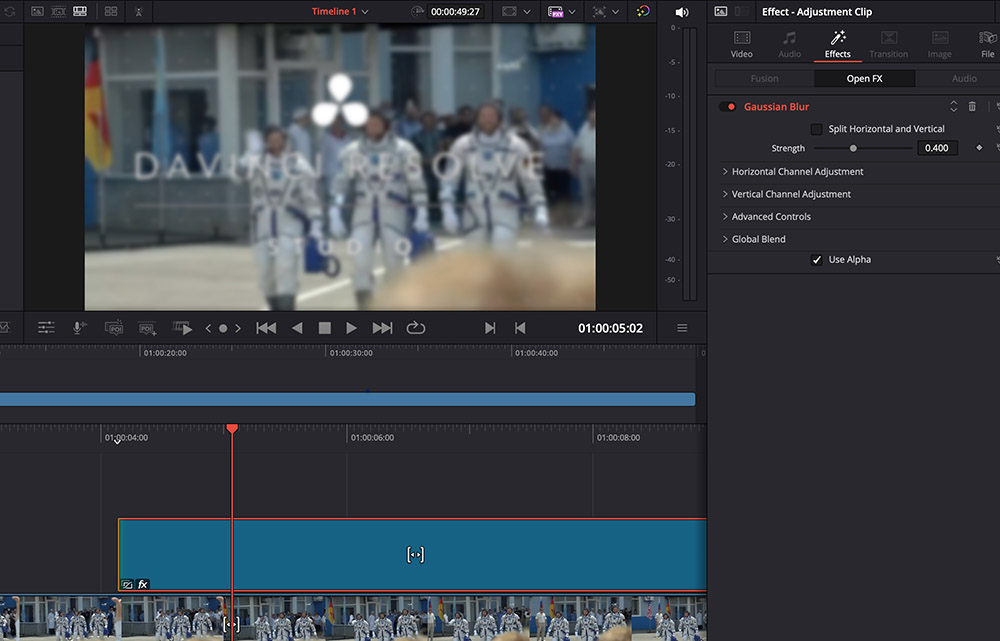
- Under Effects, drag Adjustment Clip onto a new track above your main video clips in the timeline.
- Resize and Position the Clip
Stretch or trim the Adjustment Clip so it covers the section of the timeline where you want your effect applied. Everything beneath it will be affected. - Apply Effects to the Adjustment Clip
- Select the Adjustment Clip in the timeline.
- Open the Inspector or go to the Color page.
- Apply your color correction, LUT, blur, or transition.
- Voilà — all clips under that section inherit those changes instantly!
- Fine-Tune or Remove Anytime
Because it’s non-destructive, you can disable, adjust, or delete the Adjustment Clip without altering your original footage.
Pro Tip
Stack multiple Adjustment Clips to experiment with looks — one for color, another for effects, and another for text overlays. This layered workflow makes it easy to toggle creative choices on and off as you refine your edit.
Use Cases
Corporate videos: Apply consistent branding color grades to intros and outros.
Short films: Add a unified cinematic tone to all scenes.
Social content: Quickly preview how filters or looks appear across an entire reel before finalizing.
Give this technique a try in your next project — you’ll be amazed how much faster and more flexible your workflow becomes!
If you want to level up your DaVinci Resolve skills, check out Ledet Training’s upcoming video production and post-production classes.