
Excel Tip of the Week: Repeat Values Every X Rows Automatically
Need to repeat a list of values every X rows without copy-pasting forever? In the below example we will use 12.
How to Repeat Values Every 12 Rows
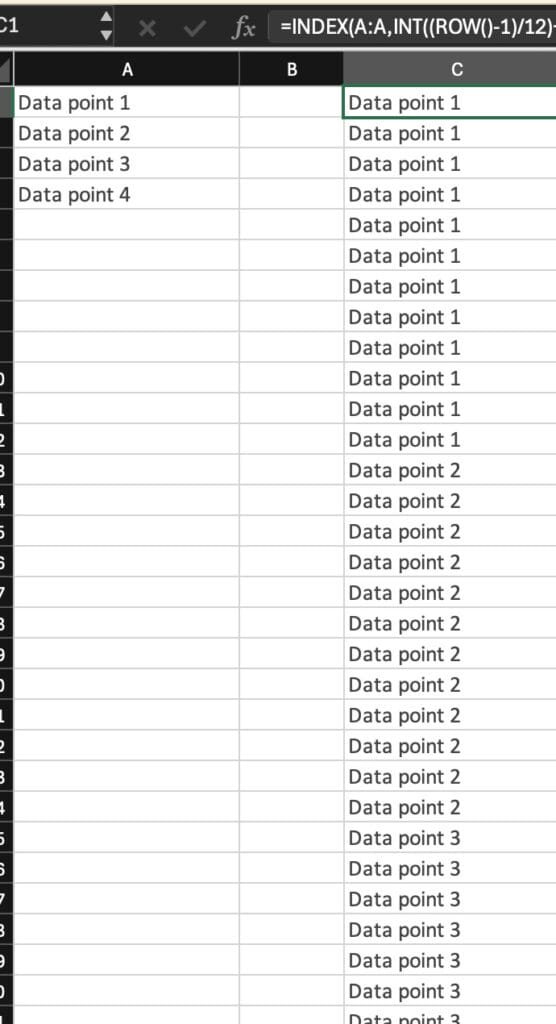
Let’s say you’ve got a list of values in Column A (A1:A10), and you want each one to repeat every 12 rows in Column B.
- In cell B1, enter this formula:
=INDEX(A:A,INT((ROW()-1)/12)+1) - Drag the formula down as far as needed — the values from Column A will repeat every 12 rows in Column B.
How It Works:
INDEX(A:A, …)→ Pulls data from Column AROW()-1→ Gets the current row number (adjusted by 1)INT((ROW()-1)/12)→ Groups rows into sets of 12+1→ Shifts the index to start from the first item
So for every 12 rows, the formula moves down one item in Column A. Simple and powerful!
When to Use This:
- Generating repeated labels for print layouts or forms
- Building time-based schedules (e.g., monthly repeated tasks)
- Creating templates for calendar-based data
- Preparing datasets for visualization or automation
Pro Tip:
If your data starts on a different row, adjust ROW()-1 accordingly. For example, if your data starts on row 5, use ROW()-5instead.
No more manual duplication. This formula keeps your data dynamic and easy to scale.